3DCS 2024 Tutorial Series

Model Navigator
**Rename.**Each feature that was selected will be edited consecutively. Select [Quit All] to end the command for all selected features.
Animation Accelerator
需要额外的license

Step Plane Move
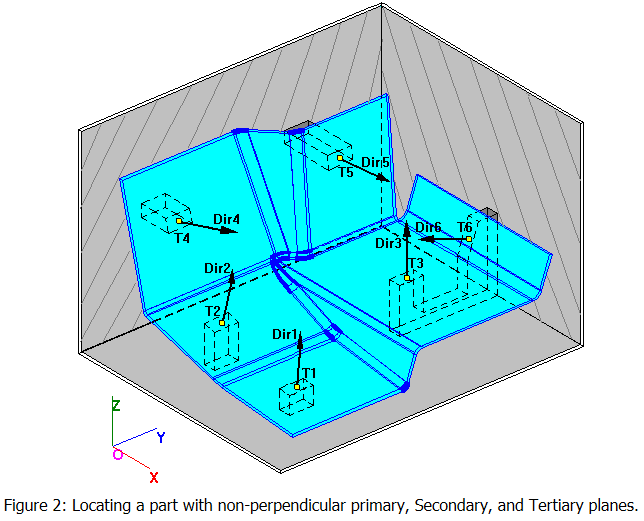
If the part's primary locating planes are oriented in the same direction, and the secondary planes are oriented in the same direction, the Step Plane move may be the best choice for locating the part.
Unlike the Six-Plane move, the Step Plane uses only one direction to orient the primary planes, one direction to orient the secondary plane, and one for the tertiary.
Because there are only three and not six directions to be concerned with (as in the Six Plane Move), modeling with the Step Plane move is easier.
Although there is only one direction to define the primary plane, it does not mean that the three primary locating points must be coplanar. The locating planes are parallel but may be stepped (parallel but offset a certain distance) relative to each other. Hence the name "Step Plane".
The Step Plane move locates an object to a target with six points and six planes (three primary, two secondary, and one tertiary).
The Step Plane dialog box only allows three directions to be entered.
- Direction one (Dir#1) orients the first three primary planes.
- The second direction defines the orientation of planes four and five.
- The third direction orients plane six.
At the completion of the move, each point will lie on its corresponding plane.
If AssocDir is selected for Dir1, the direction will be the vector associated with T1 or O1 if Object Plane is selected.
If AssocDir is selected for Dir2, the direction will be the vector associated with T4 or O4 if Object Plane is selected.
If AssocDir is selected for Dir3 , the direction will be the vector associated with T6 or O6 if Object Plane is selected.
If the primary direction vector type is Default, the direction will be defined normal to the plane through the three primary target points. In this case there is no primary step.
If the secondary direction type vector is Default, the direction will be defined (after the primary direction has been established) by a plane through the two secondary points that is normal to the primary direction. In this case there is no secondary step.
If the tertiary direction vector type is Default, the direction will be defined (after the primary and secondary directions have been established) as normal to the primary and secondary directions.
The Step Plane move is well suited to many applications because the primary, secondary and tertiary directions need not be mutually perpendicular.
If the parallelism requirement for the primary or secondary planes stated above is not reasonably met, the Six-Plane move should be considered instead. When using the move with contoured surfaces, the user must bear in mind that the move approximates each contact region as a plane with the specified normal vector.
如果不能合理地满足上述主平面或副平面的平行度要求,则应考虑采用六平面移动。当对轮廓表面使用移动时,用户必须记住,移动将每个接触区域近似为具有指定法向量的平面。
Six-Plane move
Most other moves can be done with the Six-Plane move if necessary. There are no orientation requirements for the six planes except that they must constrain all degrees of freedom.
If AssocDir is selected, the direction will be the vector associated with the object or target point in the corresponding position of that list.
At times it can be difficult to recognize why a move might be ill-defined. For this reason the user should include measurements in the model to verify that the move is working correctly.
Since a plane is defined by a point and a direction, the locating plane will be on the target or object depending on where the direction is defined.

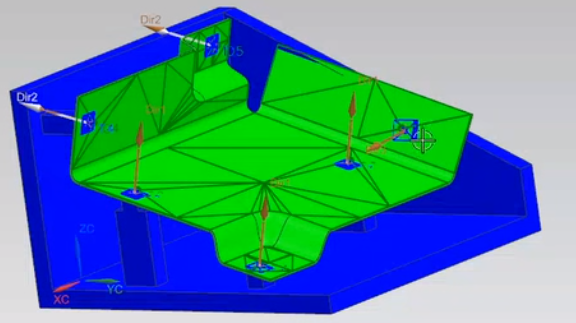
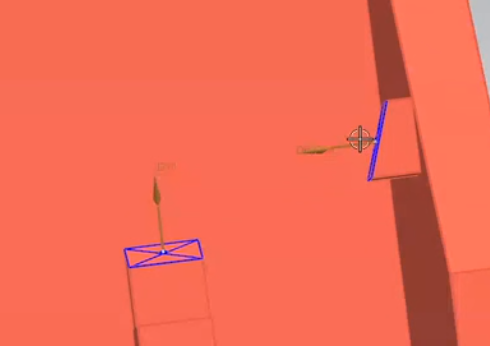
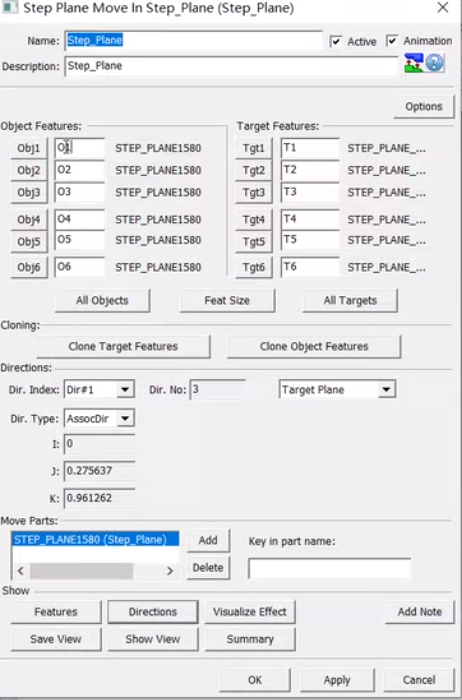
dir1一般选assocdir,第一个点的方向
dir2选auto,过4,5线,垂直第一基准面(视频教程里说的,实际不太理解)
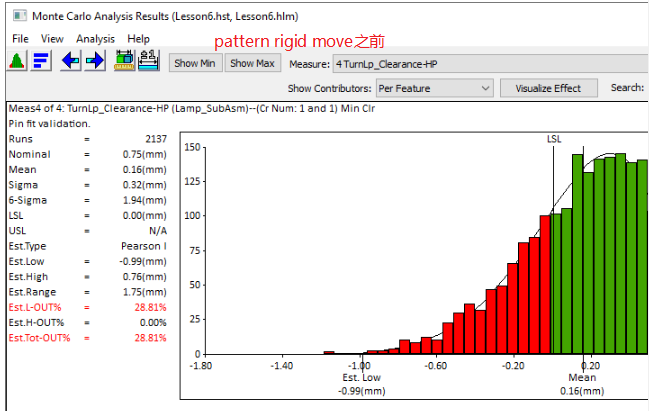
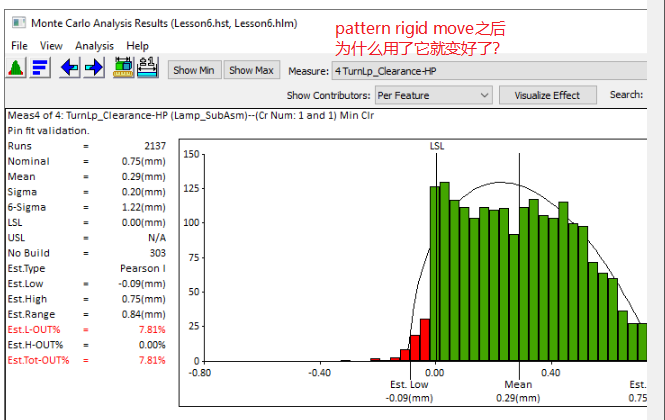
Pattern Rigid move
Since the Pattern Rigid Move is only locating in the secondary and tertiary directions, a preliminary move is needed to move the object part(s) to the target part(s) in the primary direction.
Fixed-Fastener
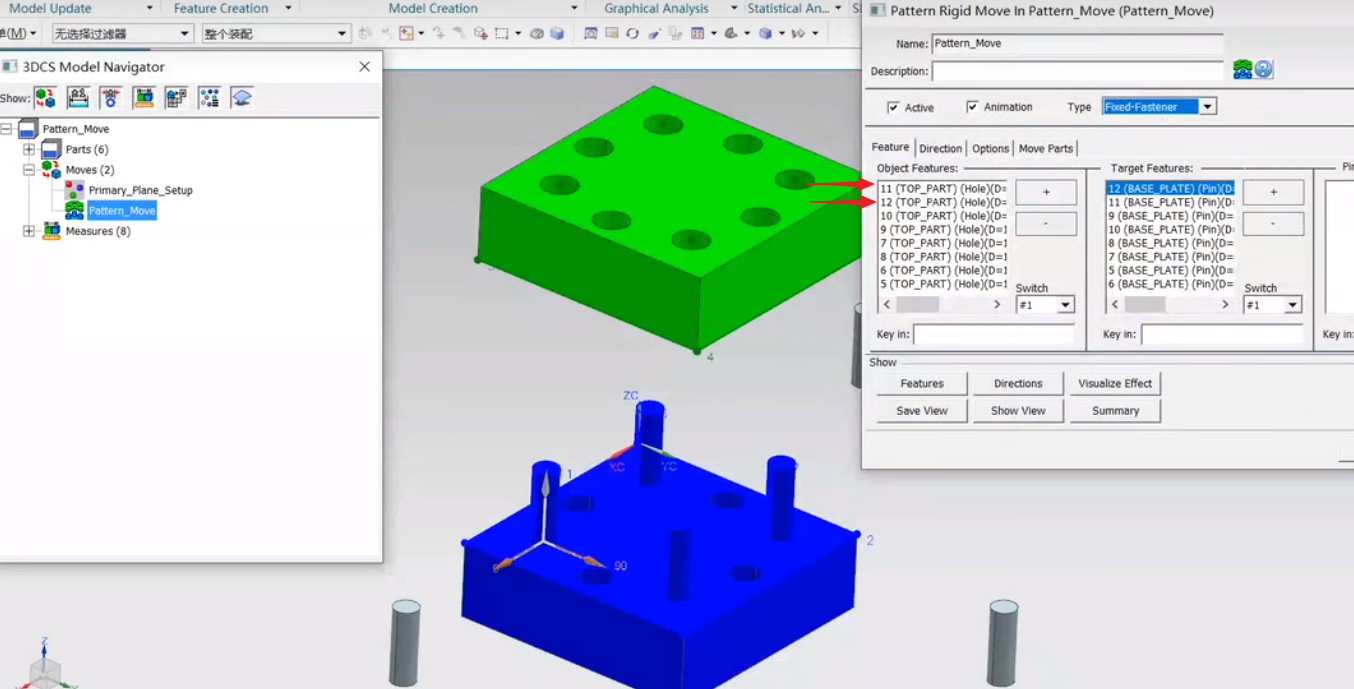
B站视频教程讲解:因为柱子比较长,为了准确,每个柱子选择最上面和最下面两个点,跟孔的最上面和最下面配合,四个柱子和四个孔就是八组点。如果只是选择柱子的中心点一个点装配,可能会有倾斜的问题。
Float-Fit-Fastener (Max Opening)
Float-Pin-Fastener
Float-Fit-Fastener是后面加的功能,一般选择Float-Pin-Fastener就可以了
Float-Hole-Slot-Pin
Best-Fit move
Two-Point move
The object point O1 moves to the target point T1.
The object component then rotates about target point T1 until the line formed by object points O1 and O2 is collinear with the line formed by target points T1 and T2.

Special Case I
T1 = T2 and O1 = O2
In this case the object part will be translated to the target point with no rotation of the object part.
The Object points can be selected from different parts.
The Target points can be selected from different parts.
Three-Point move


先把O1移动到T1重合,再把01-02和T1-T2线重合,再把object按01-02旋转,让03落在T1,T2,T2形成的平面上
Iteration move
If the number of iterations completed is equal to the number set in the Iterations field or the measured value is within spec, the loop stops.
如果完成的迭代次数等于迭代字段中设置的次数,或者测量值在规格范围内,则循环停止。
If the measured value is closer to the spec limits than in the previous step, the part will be moved with the same increment in the same direction.
如果测量值比上一步更接近规格限值,工件将以相同的增量沿相同方向移动。
If the measured value is farther away from the spec limits than in the previous step, the part will be moved with the ½ of the previous increment in the opposite direction (for the Bisection method) or moved with the calculated increment (for the Bracketing Secant method).
如果测量值比上一步更远离规格限值,工件将以上一步增量的 ½ 沿相反方向移动(对于 "二等分 "方法),或以计算出的增量移动(对于 "括弧切分 "方法)。
In either case, the moves included in the loop are performed.
无论哪种情况,都将执行循环中的移动。